

3 Patti No1 Deposit via JazzCash & Easypaisa
Add balance to your 3 Patti No1 account using JazzCash or Easypaisa. Follow the deposit steps, check your payment in the app’s Record section, and learn what to do if a successful transaction does not appear in your game balance.

How to Deposit in 3 Patti No1
Open 3 Patti No1 and sign in to the account where you want to add balance. Then follow these steps:
Open the Pay Section
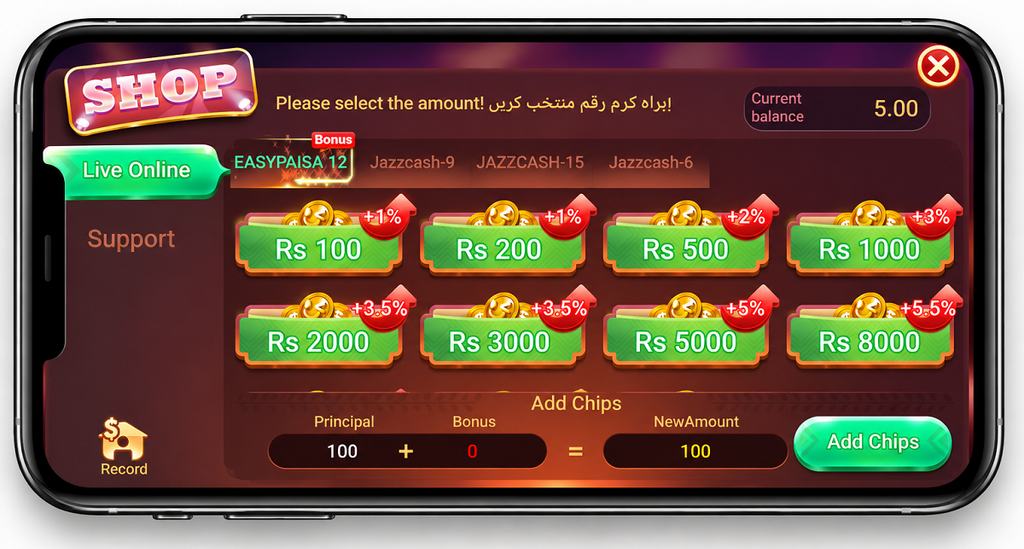
Go to the payment area of the app and tap Pay.
Choose a Payment Method
Select JazzCash or Easypaisa from the available payment options.
Select the Deposit Amount
Choose the amount you want to deposit from the options displayed on the screen.
Check the Payment Details
Review the selected amount and payment information carefully before continuing.
Tap Add Chips
Tap Add Chips and follow the payment instructions displayed by the app. Complete the transaction using your selected JazzCash or Easypaisa wallet.
After completing the payment, return to the app and check whether the balance has been added to your account.
Deposit Through JazzCash or Easypaisa
The payment screen provides separate options for JazzCash and Easypaisa. Select the method you want to use before proceeding with the transaction.
Check the wallet or account details displayed for the current transaction before sending money. Avoid relying on details saved from an older transaction or screenshot because the payment information shown by the app may change.
After paying, keep the transaction confirmation or transaction ID until the balance has appeared correctly in your game account.
How to Check Your Deposit Record
3 Patti No1 includes a Record option where users can check their deposit and withdrawal transaction history.
If you are unsure whether a deposit was processed, open the Record section and find the relevant transaction. Check its status and compare it with the transaction shown in your JazzCash or Easypaisa wallet.
This is particularly useful when money has been deducted from your wallet but the game balance has not updated.
If the Record section shows the deposit as successful but the balance is still missing, take a clear screenshot of the relevant transaction record. You can provide the screenshot and transaction details to the support team available inside the app.
Deposit Successful but Coins Not Showing
A transaction may sometimes be completed successfully while the coins or balance do not immediately appear in the game. A slow or interrupted internet connection during or after payment may also delay the updated balance appearing on your screen.
If the app's Record shows the transaction as successful but the coins have not been added, take a screenshot of that record and contact the support team inside the app with the transaction details.
Do not immediately make the same deposit again while the status of the first payment is still unclear.
Money Deducted but Deposit Not Showing
If money has been deducted from JazzCash or Easypaisa but the deposit is not showing in your game account, first check the Record section inside the app. Then compare it with your wallet transaction history.
If the transaction is still processing or its status is unclear, allow some time for the payment status to update. Check the app and your wallet again after a few hours rather than immediately repeating the payment.
If your JazzCash or Easypaisa wallet shows a successful transfer but the app does not show the expected balance, keep the wallet transaction details and contact the in-app support team.
If the problem appears to be related to the wallet transaction itself, contact the relevant JazzCash or Easypaisa support service and provide the transaction information they request.
Deposit Pending or Failed
A deposit may remain pending or fail because of an interrupted internet connection, a temporary payment-processing problem, or another issue during the transaction.
Before trying another deposit, check:
- Wallet Balance: Was the amount actually deducted?
- App Record: Does the transaction appear under Record, and what status does it show?
- Wallet History: Does JazzCash or Easypaisa show the payment as successful, pending, or failed?
- Internet Connection: Make sure you have a stable connection before reopening the payment section.
If no money was deducted and the transaction clearly failed, you can follow the current deposit instructions in the app when trying again.
If money was deducted, establish the status of that transaction before making another payment.
Contact Support About a Deposit Problem
For a deposit issue involving your game account, use the support option available inside 3 Patti No1.
Before contacting support, collect the useful details of the affected transaction. These may include:
If possible, take a screenshot of the relevant transaction in the Record section and send it with your explanation. This gives the support team a clearer reference for the deposit you are asking them to check.
Do not share your wallet password, OTP, PIN, or other private login credentials when reporting a deposit problem.

Before Making Another Deposit
Always confirm what happened to your previous transaction before starting another one.
If the previous deposit is missing, check both the app's Record and your JazzCash or Easypaisa transaction history. Keep the payment record until the issue has been resolved or the balance appears correctly.
This can help avoid accidentally making the same payment twice while an earlier transaction is still being processed.
Frequently Asked Questions
These answers cover common questions that may come up before or after making a deposit.
Can I deposit using JazzCash or Easypaisa?
JazzCash and Easypaisa are shown as payment options on the deposit screen we reviewed. Check the payment methods currently displayed inside the app before starting a transaction because available options can change.
Where can I check my previous deposits?
Open the Record option inside the app. It contains transaction records that can be used to check deposit and withdrawal activity.
What should I do if the deposit is successful but coins are not showing?
Reopen the app with a stable internet connection and check your balance and the Record section. If the relevant deposit shows as successful but the balance remains missing, take a screenshot of the transaction and report the issue through the support option inside the app.
What if money was deducted from JazzCash or Easypaisa?
Compare your wallet transaction with the app's Record. If the transaction is not resolved immediately, allow some time and check again. If necessary, contact the in-app support team or the relevant wallet support service with the transaction details.
Should I deposit again if my first payment is missing?
Avoid repeating the payment until you know whether the first transaction was successful, pending, or failed. This reduces the risk of making an unintended duplicate payment.
Final Check
Before making a deposit, verify the payment method, amount, and payment details currently displayed inside the app. After paying, keep the transaction record until your game balance has updated correctly.
If something goes wrong, check Record inside 3 Patti No1 and compare it with your JazzCash or Easypaisa transaction history before taking further action.
Please also review our Privacy Policy and Disclaimer for information about this website and the use of its content.