

3 Patti No1 Login & Registration
Use the account options in 3 Patti No1 to sign in with your existing details or create an account through the registration screen. This page shows the login fields, registration process, OTP verification, and the basic checks to make when you cannot access your account.

How to Login to 3 Patti No1
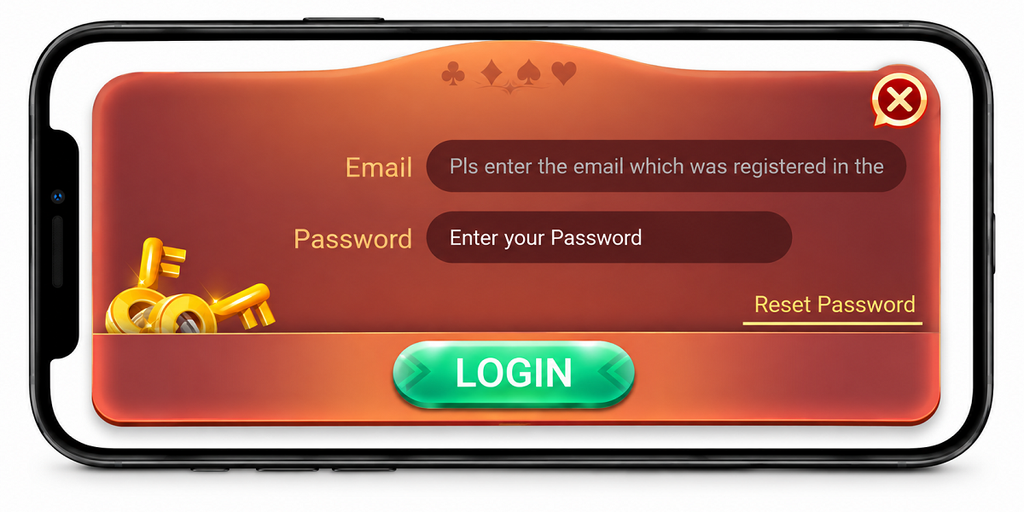
If you have an account, open the app and select Login from the opening screen. The login screen provides separate fields for your email and password.
Open 3 Patti No1
Launch the app on your Android phone and wait for the opening screen to load.
Tap Login
Select Login instead of Play as Guest to open the account login screen.
Enter Your Email
Type the email address connected with your account in the Email field.
Enter Your Password
Enter your password carefully and check the details before continuing.
Tap LOGIN
After entering your email and password, tap LOGIN to submit the details and continue with the account sign-in.
Forgot Your Password?
If you cannot remember your password, use the Reset Password option shown on the login screen and continue with the recovery options provided there.
How to Register on 3 Patti No1
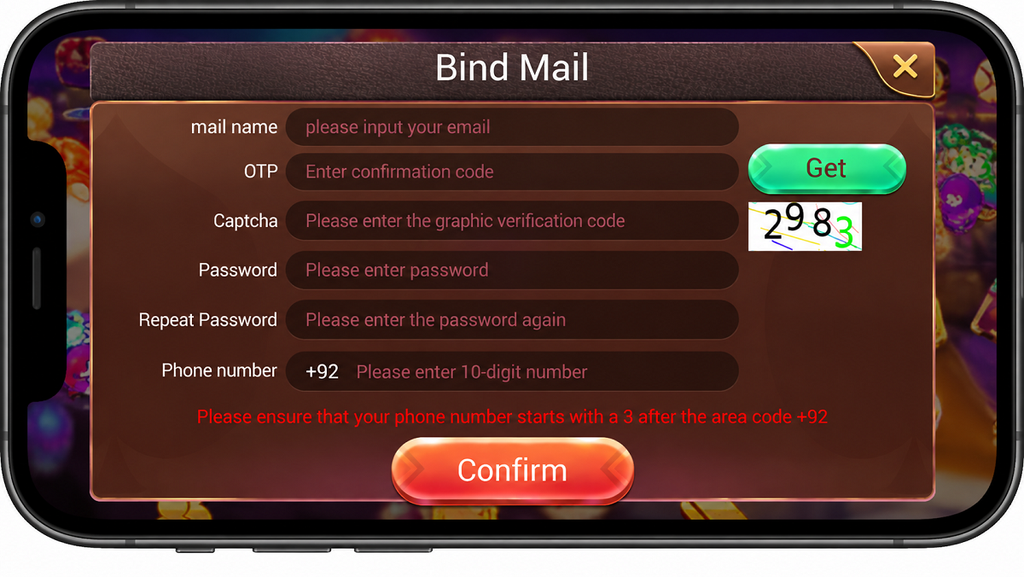
The account registration screen appears as Bind Mail in the app. It includes email verification, captcha, password, and phone number fields that need to be completed before you tap Confirm.
Enter Your Email
If you have not installed the app yet, complete the download first. Then open the Bind Mail screen and enter the email address you want to use for the account.
Get the OTP
Tap Get beside the OTP field, then check the email address you entered for the verification code. Enter that code in the OTP field.
Complete the Captcha
Enter the captcha displayed on the registration screen in the captcha field before continuing.
Create Your Password
Choose a password and enter it in the Password field.
Repeat the Password
Type the same password again in the Repeat Password field so both password entries match.
Enter Your Phone Number
Select +92 and enter your Pakistani mobile number. The registration screen asks for the remaining 10-digit number after the country code.
+92 • 10-digit mobile numberTap Confirm
Check the email, OTP, captcha, password, and phone number you entered. When the details are ready, tap Confirm to submit the registration information.
Play as Guest
The opening screen also provides a Play as Guest option alongside Login. You can use this option when you want to enter the app without using the normal account login screen.
Enter with Play as Guest
Open the app and tap Play as Guest on the opening screen. Login and registration remain separate options when you want to use account details.
Login or Registration Not Working?
If you cannot complete login or registration, first check the information entered on the screen. Use the checks below according to the problem you are experiencing.
Check Your Login Details
Make sure the email and password are entered correctly. Check for typing mistakes or unwanted spaces before tapping LOGIN.
Check Your Email and OTP
If you are registering an account, make sure the email address entered on the Bind Mail screen is correct. Tap Get to request the OTP and check that email for the verification code.
Complete the Captcha
Make sure the captcha is entered correctly before submitting the registration details. If a new captcha appears, use the current one shown on the screen.
Check Your Internet Connection
Make sure your phone has a working internet connection while logging in or registering. If the connection is unstable, reconnect and try again.
Reopen the App
If the Login, Get, or Confirm option does not respond, close the app and open it again. If the problem started after setting up the APK, review the installation steps and then try opening the app again.
Frequently Asked Questions
Can I open 3 Patti No1 without logging in?
The opening screen includes Play as Guest as well as Login. You can select the guest option when it is available on your screen.
What information is needed to login?
The login screen asks for an Email and Password.
What information is required for registration?
The Bind Mail screen includes email, OTP, captcha, password, repeat password, and phone number fields.
What should I do if I forget my password?
Use the Reset Password option displayed on the login screen and follow the recovery options shown by the app.
What should I do if the OTP does not arrive?
Check that the email address entered on the Bind Mail screen is correct and request the OTP again. If it still does not arrive, try a different email address and request a new code.
Final Check
Before submitting your login or registration details, check each field carefully. Existing users can sign in with the email and password fields on the Login screen, while new users can complete the required fields shown under Bind Mail. You can also choose Play as Guest from the opening screen when you want to enter without using the normal account login.